
Dji Osmo Mobile 7
৳
৳
SAVE ৳
- Native Tracking With Integrated Audio & Lighting Capabilities
- Robust 3-Axis Gimbal Stabilization
- Easy Tutorials & One-Tap Editing
- Quick Fold & Quick Launch
- Built-in Tripod
- 10-Hour Battery Life & Phone Charging
In Stock
Warranty :
DJI Official 1 Year Warranty
Distributor :
DJI Authorized Dealer
Brand :

Estimated Delivery :
Dhaka inside 24 hr | outside 24-48 hr
Osmo Mobile 7 Series
Focus on Every Move
Capture every highlight effortlessly. Introducing Osmo Mobile 7 and Osmo Mobile 7P, designed to be lightweight, portable, and user-friendly. Featuring DJI's seventh-generation stabilization and ActiveTrack 7.0 technology, these smartphone gimbals take three-axis stabilization and intelligent tracking to new heights. With a range of intelligent features, capturing cinematic-quality footage has never been easier.
Native Tracking & Versatile Functionality

Osmo Mobile 7P includes a Multifunctional Module that allows you to easily track subjects without the DJI Mimo app. Simply show your palm to the module or press the trigger to effortlessly lock onto and follow moving subjects using your phone's native camera app, live streaming apps, or other camera apps. Every moment is fully under your control.
The Multifunctional Module combines intelligent tracking, DJI Mic Mini reception, and lighting features into one compact unit. Its magnetic clip design allows for easy attachment and detachment. It also supports remote gesture control. Whether recording daily life or crafting content for social media, you can seize every amazing moment confidently.
Always Focused, Always Ready
With advanced smart capture algorithms, the Multifunctional Module skillfully maintains focus on the lead to ensure smooth and continuous tracking, even in complex scenes with multiple subjects. Whether you're capturing sports events or shooting vlogs, every project flows effortlessly, unlocking endless creative possibilities.
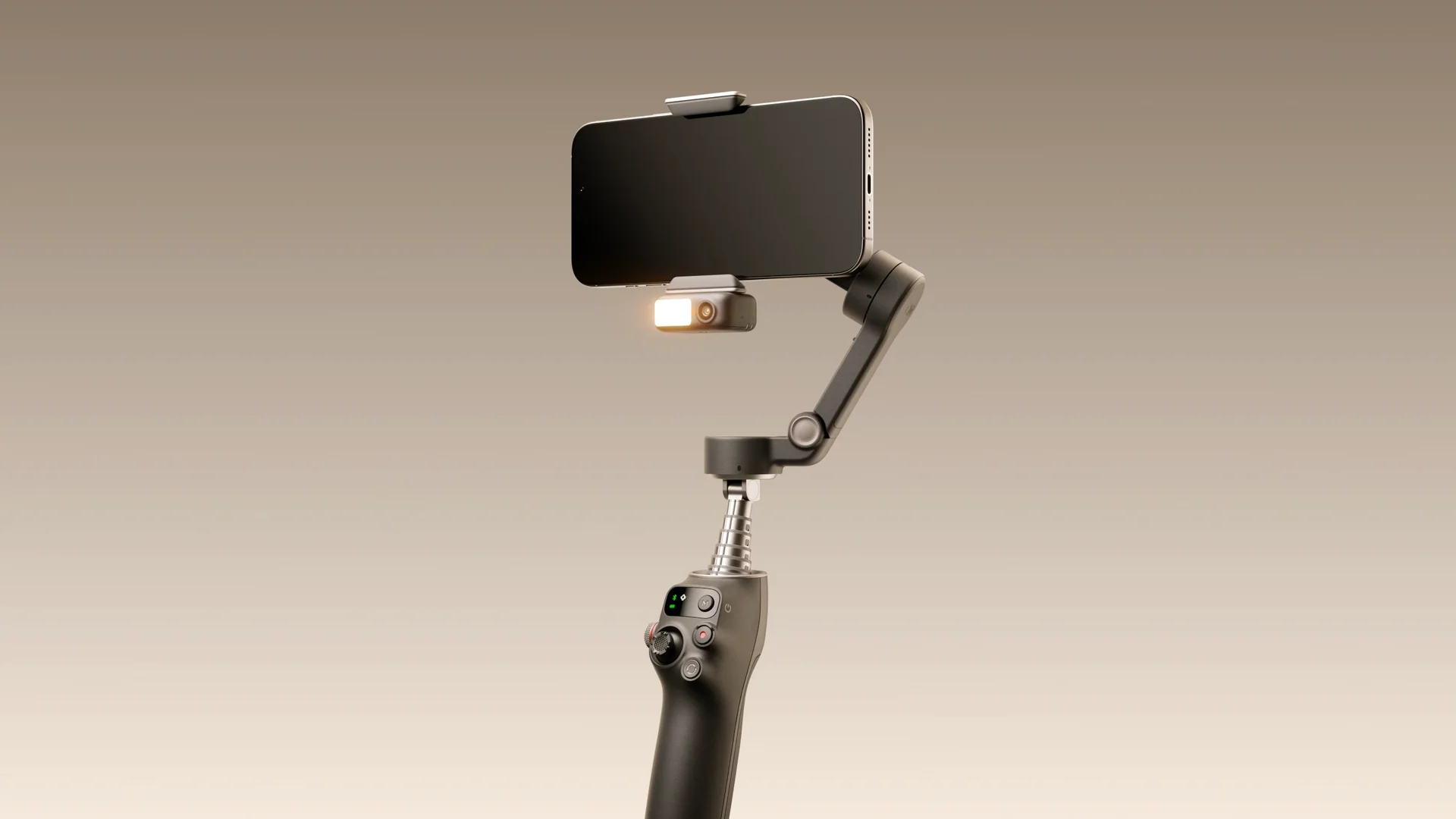
Seamless Integration, Effortless Setup
Lighting
The fill light offers adjustable brightness and colour temperature, improving image quality in overcast or low-light conditions, ideal for live streaming and daily recording.


Audio Reception
Thanks to the DJI OsmoAudio™ ecosystem, pair with the Mic Mini Transmitter for immersive, crystal-clear sound in your live streams and vlogs.
Built-in Extension Rod
With the built-in extension rod, you can include more friends, pets, or stunning scenery in your selfies, and unlock creative high and low angles for your vlog shots.


Built-in Tripod
The built-in tripod eliminates the need for additional accessories. Simply unfold it for stable placement, making solo creation effortless and storage hassle-free.
The Osmo Mobile 7 Series is built to last, offering up to 10 hours of operating time. It supports your recording and creative pursuits all day long, and with its USB-C port, it can also charge your phone—ideal for extended outdoor filming and live streaming.


When the Multifunctional Module functions as a microphone receiver, its USB-C port connects to your phone to deliver high-quality audio transmission while also providing extra power. This ensures you can continue creating in outdoor settings without access to power sources, so you never miss capturing your highlight moments.
Capture Like a Pro From Day One

ActiveTrack 7.0: Smarter Than Ever
Subject Tracking:No matter how you move or change direction, the gimbal automatically adjusts and follows your movements, keeping you in the spotlight at all times. Capture stunning, attention-grabbing footage with ease.
Smart Capture:
The gimbal intelligently detects multiple subjects. With a simple tap, you can lock onto a subject and begin tracking. Effortlessly switch between different subjects by tapping on their selection boxes. It's intuitive and responds instantly.
Smooth Tracking:
No matter how you move or change direction, the gimbal automatically adjusts and follows your movements, keeping you in the spotlight at all times. Capture stunning, attention-grabbing footage with ease.
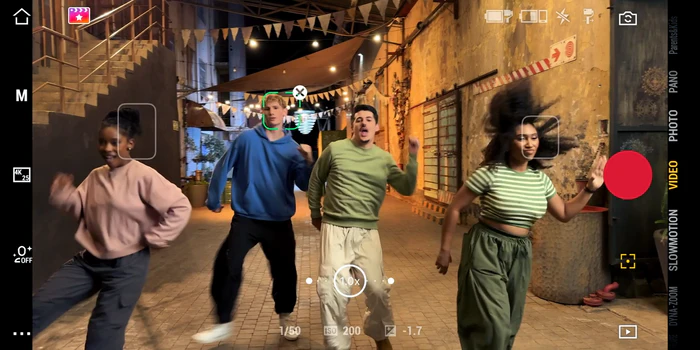

Capture With a Gesture
The Multifunctional Module supports gesture control. No matter how you want to capture, a simple gesture does it all."Palm" Gesture
Show your palm, and the intelligent tracking will start or stop instantly. No matter how the gimbal moves, it follows your lead.
"V" Gesture
Make a "V" gesture to effortlessly take a photo or start/stop video recording. It makes capturing moments simple and fun.
"Double L" Gesture
Use the "Double L" gesture to adjust framing. No matter how you move, the camera automatically frames you just right, so you're always in the ideal spot.

One-Tap Editing
Pair the Osmo Mobile 7 Series with the DJI Mimo app to enjoy AI-powered one-tap editing and a range of exclusive video templates. From shooting to processing, it's a one-stop solution truly friendly for new creators.


ShotGuides
ShotGuides automatically analyzes your scenario and recommends a shot sequence, along with a tutorial for how to get it. Choose from a range of templates, follow the instructions, and shoot like a pro in no time.
Compatible With Android & iOS Ecosystems
Enhanced Compatibility With Android Phones
The all-new magnetic phone clamps offer versatile compatibility, seamlessly accommodating even Android phones with large camera setups. This ensures smooth and stable shooting experiences across a wide range of Android devices, from entry-level models to high-end flagships


DJI OM Magnetic Quick-Release Mount
Designed for iPhone users, this mount offers easy attachment and detachment for hassle-free creation.
Remote Control With Watch
Install the DJI Mimo app on your Apple Watch to turn the watch into a smart remote for the gimbal. Remotely view camera feeds from your watch, adjust the gimbal's angle, switch between portrait and landscape modes, and take photos or record videos. This breaks the constraints of close-range handheld shooting, allowing for more freedom in framing and composing.
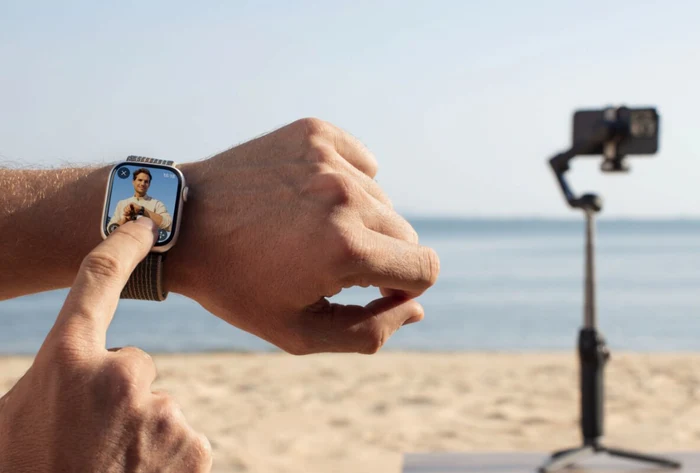
Powerful 3-Axis Gimbal Stabilisation
The Osmo Mobile 7 Series utilizes DJI's seventh-generation stabilization technology to provide consistent stability without compromising image quality. Capture bursts of inspiration and create stunning, cinema-quality masterpieces with phones weighing up to 300 grams.Flexible Motion, Endless Inspiration
PTF
The camera view follows the gimbal's pan and tilt movements and remains stable during rolls. This mode is great for capturing up, down, and diagonally.
FPV
The camera view follows the gimbal's movements in all directions. This is wonderful for dynamic filming of still subjects like landmarks, buildings, or statues.
PF
The camera view only follows the gimbal's pan movements and remains stable during tilts and rolls—ideal for filming horizontally or moving around a subject.
Flexible Motion, Endless Inspiration
PTF
The camera view follows the gimbal's pan and tilt movements and remains stable during rolls. This mode is great for capturing up, down, and diagonally.
FPV
The camera view follows the gimbal's movements in all directions. This is wonderful for dynamic filming of still subjects like landmarks, buildings, or statues.
PF
The camera view only follows the gimbal's pan movements and remains stable during tilts and rolls—ideal for filming horizontally or moving around a subject.
SpinShot
Push the joystick to the left or right to control the rotation of the camera view and create dynamic footage. Perfect for capturing push, pull, and high-angle movements.
PTF
The camera view follows the gimbal's pan and tilt movements and remains stable during rolls. This mode is great for capturing up, down, and diagonally.
FPV
The camera view follows the gimbal's movements in all directions. This is wonderful for dynamic filming of still subjects like landmarks, buildings, or statues.
PF
The camera view only follows the gimbal's pan movements and remains stable during tilts and rolls—ideal for filming horizontally or moving around a subject.
SpinShot
Push the joystick to the left or right to control the rotation of the camera view and create dynamic footage. Perfect for capturing push, pull, and high-angle movements.


Instant Switch for Rear-Camera Selfies
Press the trigger three times to rotate your phone's rear camera to face you, instantly accessing high-resolution image quality. This feature enables seamless transitions between subjects and scenery during vlog shooting, making your stories more vivid and dynamic without the need for extensive adjustments.Intelligent Shooting Modes
Unleash your creativity with more features at your fingertips. When connected to the DJI Mimo app, the gimbal offers a range of intelligent shooting modes, including Timelapse, Panorama, and DynamicZoom, to capture every moment of inspiration.

Focus Your Way
Effortlessly and fluidly control zoom and focus with Osmo Mobile 7P's side wheel. Roll the wheel to adjust the focal length for flexible composition and zoom in and out with butter-like smoothness. For more cinematic control, press the side wheel once to switch to manual focus. Additionally, a long press enables control over the fill light, making it easy to adjust brightness and color temperature, thus simplifying your shooting experience.Parents & Kids Mode
Using Parents & Kids Mode, the Osmo Mobile 7 Series instantly transforms into your family photographer, automatically handling camera movements to ensure you can capture moments while being present with your loved ones. After filming, you can access a variety of video templates in the DJI Mimo app to effortlessly create a digital family keepsake with just one tap.

Specifications
Dimensions
Unfolded: 278×107×93 mm (L×W×H)
Folded: 179×95×39 mm (L×W×H)
Weight
Gimbal + Built-in Tripod + Magnetic Phone Clamp: Approx. 300 g
Extension Rod
No Built-in Extension Rod
Tripod
Built-in Tripod
Length: 67 mm
Compatible Phone Weight
170-300 g
Compatible Phone Thickness
6.9-10 mm
Compatible Phone Width
67-84 mm
Bottom Port
1/4" Screw Hole
Wireless Mode
Bluetooth 5.3
App
DJI Mimo
Type
Li-Po 1S
Capacity
3350 mAh
Energy
12.06 Wh
Charging Temperature
5° to 40° C (41° to 104° F)
Operating Temperature
0° to 40° C (32° to 104° F)
Operating Time
Approx. 10 hours
(Measured with the gimbal balanced in a level and stationary state without additional accessories)
Charging Time
Approx. 2.5 hours
(Measured with a 10W USB-C charger)
Gimbal Charging Port
USB-C
Phone Charging
Supported
Controllable Range
Pan: -99° to 210°
Roll: -67° to 245°
Tilt: -20° to 40°
Mechanical Range
Pan: -109° to 222°
Roll: -77° to 255°
Tilt: -224° to 100°
Max Control Speed
120°/s
Compatibility
Osmo Mobile 7P
Supported (standard)
Osmo Mobile 7
Supported (optional)
GFSK
2 Mbps
GFSK Transmitter Power (EIRP)
< 16 dBm
GFSK Operating Frequency
2.4000-2.4835 GHz
Bluetooth Protocol
Bluetooth 5.3
Bluetooth Transmitter Power (EIRP)
< 16 dBm
Bluetooth Operating Frequency
2.4000-2.4835 GHz
Fill Light Illuminance
40 lux
Fill Light Color Temperature
2500-6000 K
What's Included

Osmo Mobile 7
x 1

DJI OM Magnetic Phone Clamp 4
x 1

Power Cable (USB-C to USB-C, 50 cm)
x 1
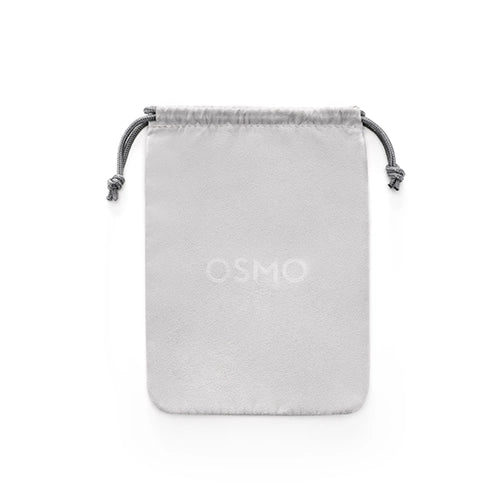
Storage Pouch
x 1
Osmo Mobile 7 has been upgraded in several areas, including the following:
1. It offers an optional Multifunctional Module with intelligent tracking, DJI Mic Mini reception, and lighting features.
2. It integrates a built-in tripod, enabling more flexible and convenient shooting.
3. It offers quick setup, allowing you to unfold it in one motion and begin filming immediately. After powering off, it automatically returns to a pre-folded position for easy storage.
4. It can work with the Multifunctional Module to enable versatile intelligent tracking, allowing seamless use with your smartphone's native camera app or third-party camera/live streaming apps.
5. It now provides up to 10 hours* of operating time and features the ability to charge your smartphone.
6. The enhanced magnetic phone clamp provides a more secure connection, even for larger smartphones.
* Measured with the gimbal balanced in a level and stationary state without additional accessories.
1. It offers an optional Multifunctional Module with intelligent tracking, DJI Mic Mini reception, and lighting features.
2. It integrates a built-in tripod, enabling more flexible and convenient shooting.
3. It offers quick setup, allowing you to unfold it in one motion and begin filming immediately. After powering off, it automatically returns to a pre-folded position for easy storage.
4. It can work with the Multifunctional Module to enable versatile intelligent tracking, allowing seamless use with your smartphone's native camera app or third-party camera/live streaming apps.
5. It now provides up to 10 hours* of operating time and features the ability to charge your smartphone.
6. The enhanced magnetic phone clamp provides a more secure connection, even for larger smartphones.
* Measured with the gimbal balanced in a level and stationary state without additional accessories.
The Osmo Mobile 7 Series is compatible with most smartphones on the market. It is recommended to use smartphones with a width of 67-84 mm, thickness of 6.9-10 mm, and weight of 170-300 g.
ActiveTrack 7.0 offers significant upgrades in its basic tracking functionality:
1. Excellent Composition: It securely locks onto the subject based on the default position (center of the frame) or a user-defined composition.
2. Stable Capture: In multi-person scenarios, even if the subject briefly leaves the frame, it can quickly and accurately be re-acquired upon re-entering.
3. Smooth Tracking: Whether following objects or pets (like cats and dogs), as long as their basic appearances remain unchanged, tracking remains smooth.
4. Outstanding Result Quality: During the tracking process, zoom functionality is supported without losing track of the subject, ensuring naturally fluid final results.
5. Smart Capture: In multi-subject scenarios, the DJI Mimo app interface intelligently displays multiple detection boxes, and tapping a detection box can trigger ActiveTrack. You can also quickly switch between subjects by tapping different detection boxes.
1. Excellent Composition: It securely locks onto the subject based on the default position (center of the frame) or a user-defined composition.
2. Stable Capture: In multi-person scenarios, even if the subject briefly leaves the frame, it can quickly and accurately be re-acquired upon re-entering.
3. Smooth Tracking: Whether following objects or pets (like cats and dogs), as long as their basic appearances remain unchanged, tracking remains smooth.
4. Outstanding Result Quality: During the tracking process, zoom functionality is supported without losing track of the subject, ensuring naturally fluid final results.
5. Smart Capture: In multi-subject scenarios, the DJI Mimo app interface intelligently displays multiple detection boxes, and tapping a detection box can trigger ActiveTrack. You can also quickly switch between subjects by tapping different detection boxes.
Android 8 or later, or iOS 12 or later.
Related Products


Total Amount
৳